How to log in
| E-mail Template |
 |
- Visit the exchange at http://exchange.cof.org
- Log in with your e-mail and password for the Council’s website. If you don’t know it, e-mail membership@cof.org
- Once you are logged in, click on “my profile” and pull in information from your LinkedIn profile or fill it in manually. You can also watch this 2-minute video on How to Set up your Profile.
- Hover over the "Communities" tab. Select "All Communities"
- Join a community! Also see our list of invitation only communities to see if you are eligible for those.
How to post through your e-mail
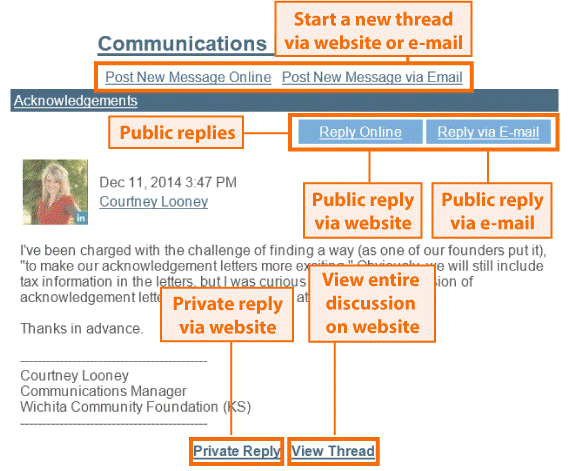
You can post on the website or directly from your e-mail. To the right, you will see a diagram of the e-mails you will receive from the Exchange. You can reply to messages and post new questions directly from this message. You can even attach a document to your e-mail reply, and it will be added to the library!
Post rule of thumb
Use the public reply for information that everyone can benefit from.
- On the Exchange website, you do this by clicking Reply to Discussion
- On e-mail, you do this by clicking Reply via E-mail or Reply Online
Use the private reply for confidential information or replies that only the sender needs to see (e.g. "thanks" "me, too")
- On the Exchange website, you do this by clicking Reply to Sender
- On e-mail, you do this by clicking Private Reply
Changing your E-mail Frequency
- In the main menu, click on "My Profile" and select "My Settings"
- Scroll to the community you are interested in changing your frequency of emails, and select either "Real Time" "Daily Digest" or "No E-mails" in the drop down menu.